
Your brand, your customers and your devices, on a far more complete platform
You already have the hardest part: customers, installed devices and a brand. Put it on a platform with much more to sell to the same customers, at a cost per vehicle that leaves you a bigger margin.
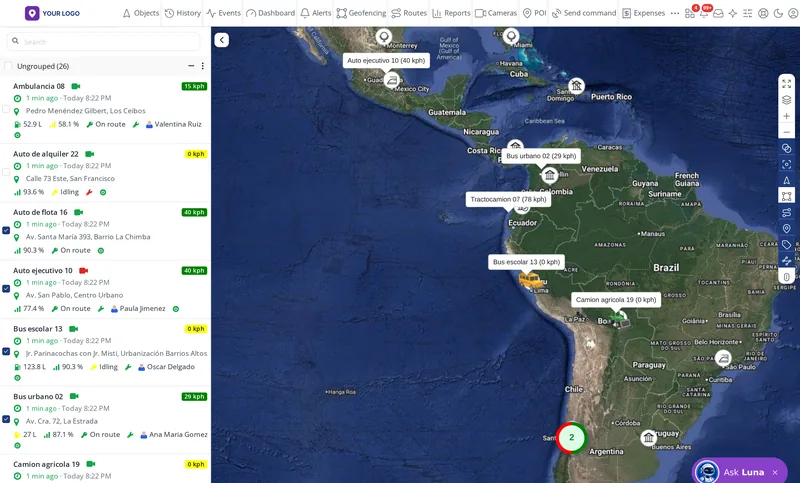
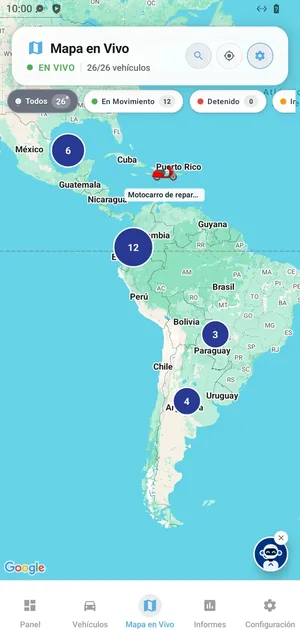
Bring your customer base as it is
You change the software, not your devices or your customers
What follows is not a summary: it is everything included, feature by feature.
We do not sell devices, only software
Bring your customer base as it is, without replacing the GPS units you already installed.
More than 3,200 supported models
Most likely the devices you already have will work.
You pay per active vehicle
No per-module fees: the 25+ applications are included.
Every improvement at no extra cost
What we add to the platform reaches you at no additional cost.
Direct with the people who build it
No middleman taking your margin. The difference between what you pay and what you charge is yours.
Are your devices on the list?
Look up your brand and model in the compatible devices catalogue.
1 · Your brand
Everything carries your brand, no third-party names
Your customer sees one brand only: yours.
- Your own domain (for example platform.yourcompany.com) with an SSL security padlock.
- Your logo, your colours and your name on the login screen, in the panel and in the emails.
- Emails and notices sent from your domain.
- Your website on your domain, ready for your company.
- You change the text your customer receives: alerts, expirations, shared links, email and SMS templates.
- User manual, FAQ and an AI assistant in Spanish, English and Portuguese.
- Panel available in more than 40 languages.
No screen, email, app or manual shows the name of another company.

2 · Your apps
Do not sell under another company’s brand
Many tracking companies hand their customers their supplier’s app, with another company’s name on the customer’s phone. Not here: use our unbranded app, or get your two apps with your name and logo for less than 4% of what they cost on the market.
- Unbranded
No extra cost
Cliente GPS, our unbranded app
 Cliente GPSGoogle Play and App Store
Real Cliente GPS screenshot, from its App Store listing.
- Already published on Google Play and the App Store.
- No logo or name of any company.
- Start today while yours is being published.
- With your brand
US$90
both apps, one-time payment
Your brandGoogle Play and App Store- Android and iPhone with your name and logo.
- Published on our store account: no publishing cost.
- For companies with fewer than 101 active vehicles.
- With your brand
Free
from 101 active vehicles
Your brandGoogle Play and App Store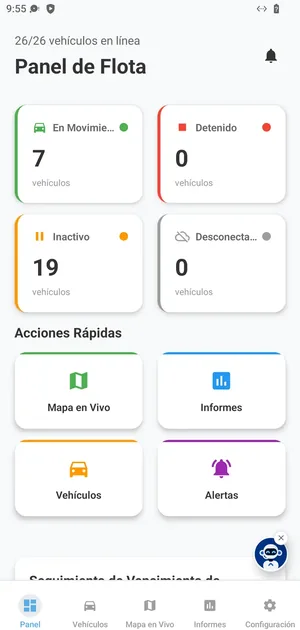
- The same two apps with your name and logo.
- On a monthly or annual plan.
- On our store account or, if you prefer, on yours.
In both options with your brand
- One app for Android on Google Play and another for iPhone on the App Store, with your company name, icon and store listing.
- No third-party brands: not inside the app, not in the store, not in the notifications.
- We handle the whole process: publishing, privacy policies, the declarations the stores require and replies to review feedback.
- Updates reach your customers without you scheduling anything.
Having your own app in the stores changes who you are compared with: you stop competing with installers and start competing with platforms.
3 · Inside the mobile app
What your customer gets in the mobile app
Swipe through the screens. They are from the app, with demo data (shown in Spanish).
The whole fleet on the map, live
With filters by status: moving, stopped, idle.
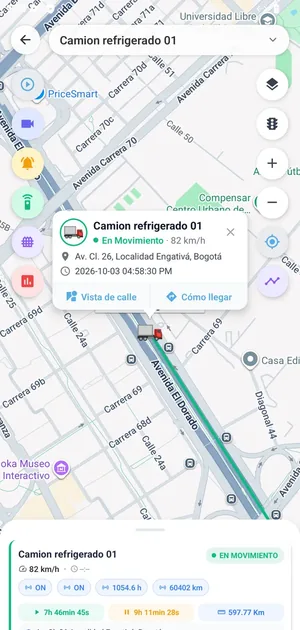
One tap shows where it is
Speed, address and time, with Street View and Directions.
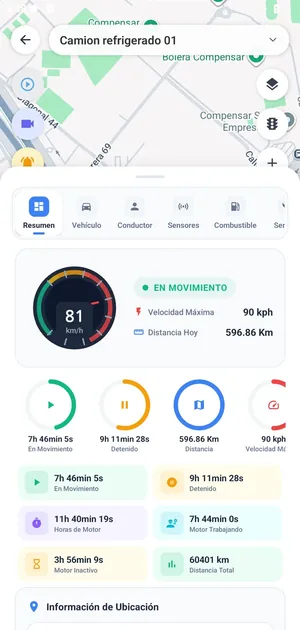
The profile of each vehicle
Time moving and stopped, distance, engine hours and sensors.
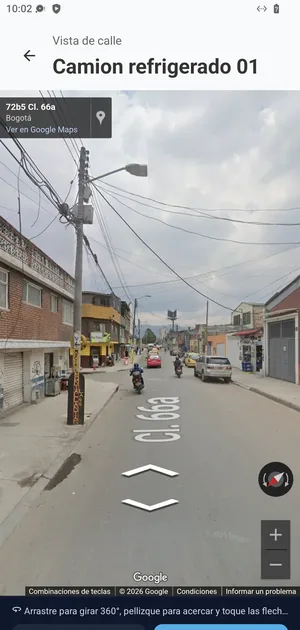
The real street where it is
Street View to confirm the place without going there.
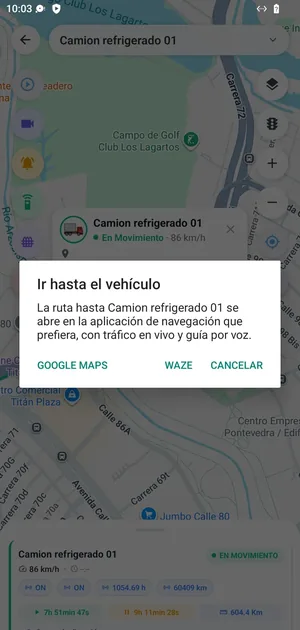
Directions to the vehicle
Opens the route in the navigation app you prefer.
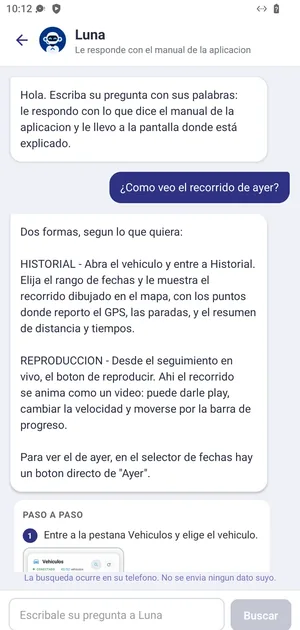
An assistant that answers instantly
It answers with the manual and takes you to the right screen.
The fleet summary
How many are moving, how many are stopped, and shortcuts.
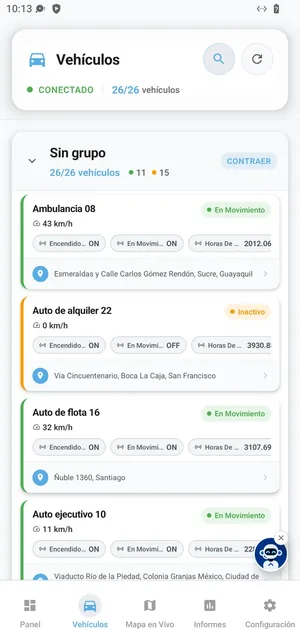
The vehicle list with its status
Speed, sensors, address and last connection.
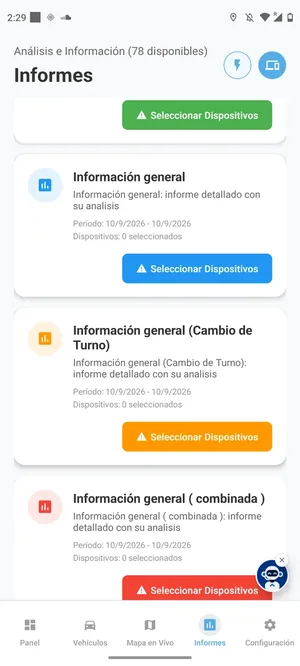
PDF reports from the phone
To view and share without opening a computer.
See the 12 app featuresHide the 12 app features
- Live map of all vehicles and real-time tracking of one.
- Vehicle list with status, speed, address and last connection.
- Profile of each vehicle with its sensors.
- Trip history and playback.
- Street View: see the real street where the vehicle is or was.
- Cameras: images and video of the vehicle from the phone.
- Send commands to the device, including engine cut-off.
- Instant push notifications and the detail of each event.
- Geofences, maintenance and PDF reports to view and share.
- Fleet summary dashboard.
- In-app support assistant that answers instantly.
- Add devices from the phone itself.
4 · The tracking panel
The tracking panel, feature by feature
Pick a topic and swipe through the screens.
The whole fleet on one map, live
Several map types and colours by status: moving, stopped, no signal.
Live map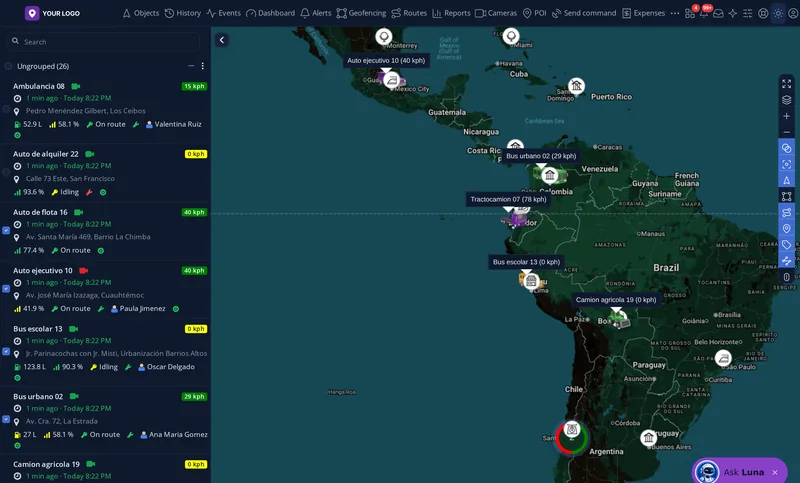
Dark mode for night shifts
The same screen, comfortable for long shifts.
Dark mode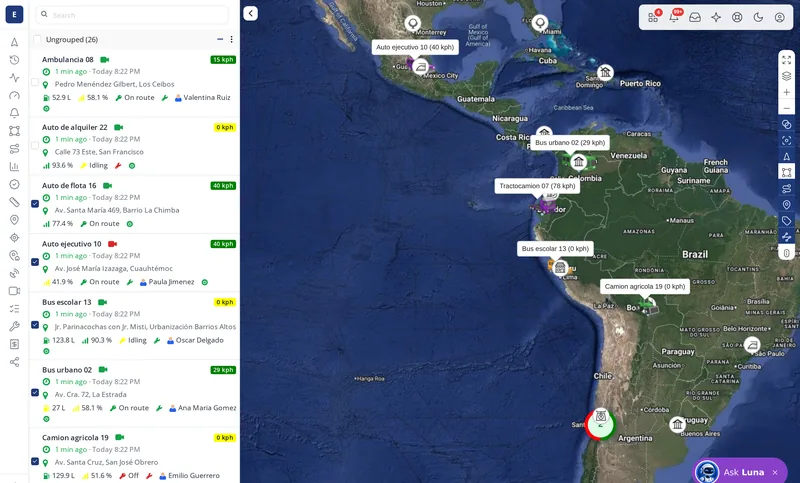
Side or top menu, as you prefer
Each user chooses; the top menu shows the name of each tool.
Side menu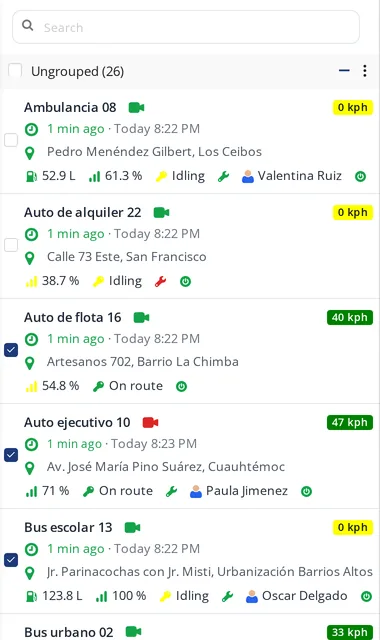
One card with everything about the vehicle
Address, fuel, signal, ignition and driver, in colour.
Full card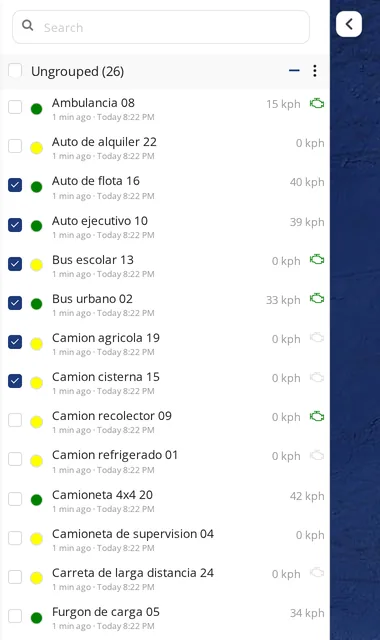
The essentials of each vehicle
Name, time of the last report, speed and a status dot.
Standard card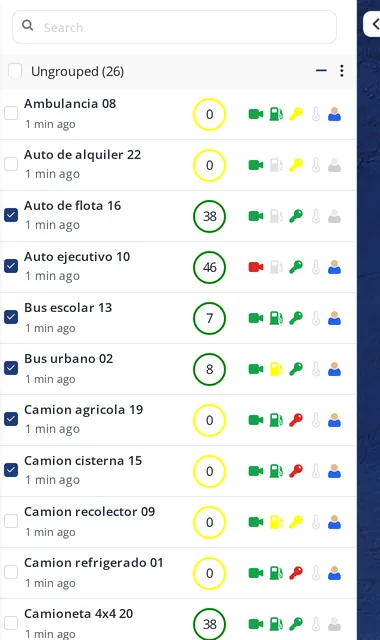
Many vehicles in little space
Speed in a coloured ring and services as icons.
Compact card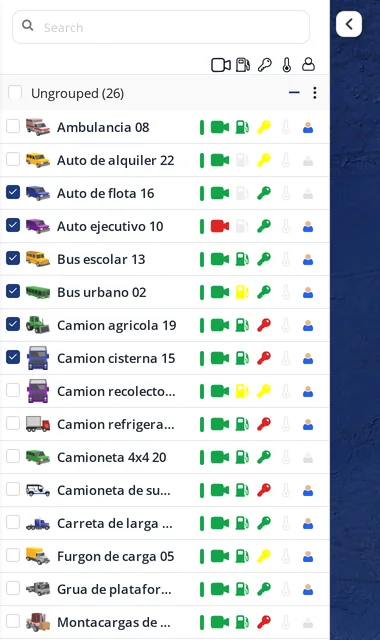
Compare the whole fleet at a glance
Up to 12 sensors in fixed columns, the same on every row.
Operational card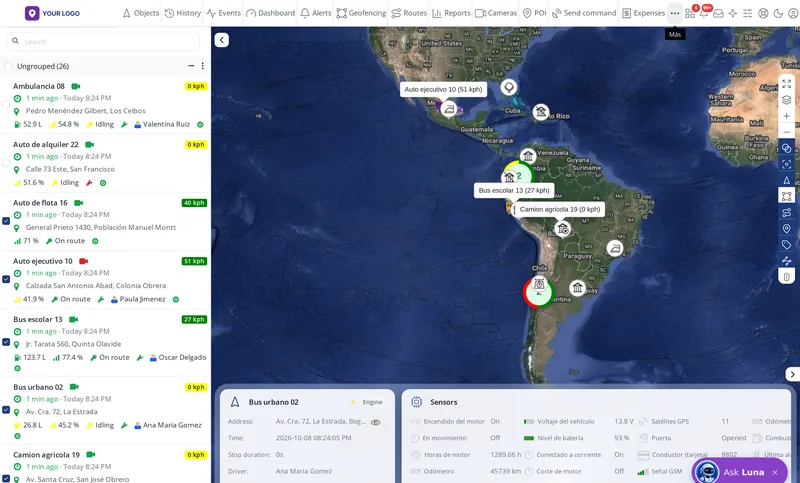
Everything about a vehicle without leaving the map
Location, sensors and device data in the bottom panel.
Vehicle profile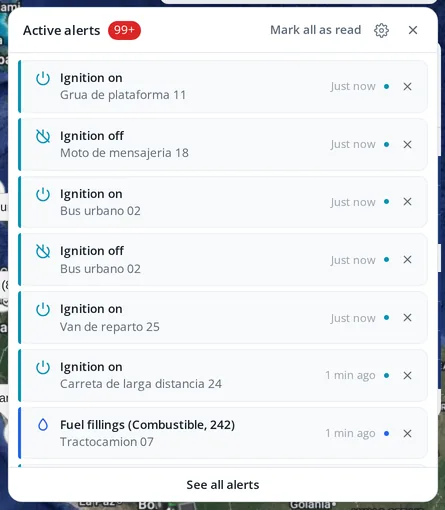
Alerts arrive instantly
Ignition on and off, speed, geofences and more, each with its time.
Active alerts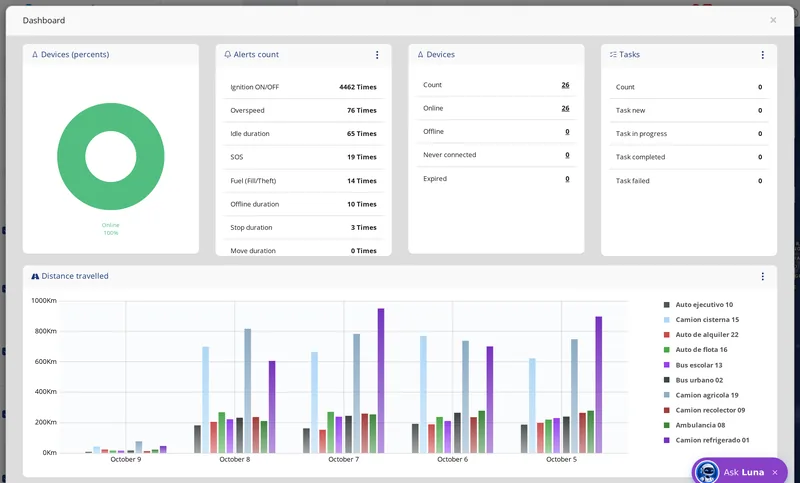
The fleet summary on one screen
Statuses, alerts, tasks and distance travelled per vehicle.
DashboardSee everything the panel includes, feature by featureHide the panel details
Map and vehicles
- Live map with several map types, including dark mode.
- 4 vehicle card types (Standard, Full, Compact and Operational), with the sensors you choose shown in colour.
- Catalogue of about 1,800 icons by category (motorcycles, trucks, buses, marine, air and more) and upload of your own icons.
- Colours by status: moving, stopped, no signal.
- Map tools: ruler to measure, show a point by coordinates and search an address.
Zones and alerts
- Circle, polygon and line or corridor geofences, to know when a vehicle leaves its route, with a deviation tolerance in minutes.
- Turn a trip into a geofence with one click.
- Geofence groups, AND/OR conditions and your own content when the geofence is tapped on the map.
- Points of interest with their own icon, and routes.
- Alerts for: overspeed, parking time, offline time, movement, ignition on and off, idling, geofence entry and exit, SOS, fuel fill and theft, distance, driver change, GPS power cut, sensor change, device expiration and custom events.
- Notices by email, SMS, mobile notification, pop-up, sound and webhook; and the alert can send a command to the device by itself.
- Schedule per alert, notification centre and event list.
Fleet control
- Send commands (such as engine cut-off), command templates and scheduled commands that go out by themselves at the time you set.
- Sensors: fuel, temperature, ignition, doors, battery and more.
- Odometer, engine hours, drivers and expenses per vehicle.
- Maintenance with reminders (oil, tyres, inspection).
- Expiration reminder from the moment the unit is created.
- Share a vehicle with a self-expiring link, no username or password.
Reports
- Kilometres, stops, trips, speed, engine hours, fuel, events, driving, more than 15 geofence reports, unvisited geofences, trips between geofences, cellular signal and GPS signal.
- Scheduled daily, weekly or monthly, emailed as PDF, Excel or HTML.
- No vehicle limit per report.
- Fleet summary dashboard.
- Operating certificate with your logo, your signature and a QR code anyone can verify.
5 · Trips
See what happened, not just where
- The route painted in colours by speed: at a glance you see where the driver sped.
- Stops, overspeeding, alerts and fuel fills marked on the map.
- Trip list with its kilometres.
- Step-by-step playback, with address, speed and the value of every sensor at each point.
- Photos along the trip: if the vehicle has a camera, the photos appear on the trip timeline with their address, time, speed and heading, together with harsh braking, acceleration and turns.
- Street View to see the real street at any point.
- Date shortcuts: today, yesterday, 7 days, 30 days or the last minutes, hours or days you type.

6 · Cameras
Cameras and live video
- Live video from each vehicle, from the panel and from the phone.
- Several cameras per vehicle.
- Glances: several cameras at once over the map, arranged one by one or two, three or four in a row, and movable wherever you want.
- Photos with a timeline, and recordings.
- Camera app password for your customer, created from the panel itself.
- Evidence after an accident or a false claim, and support with the insurer.
Video has a third-party cost: we tell you before activating it.

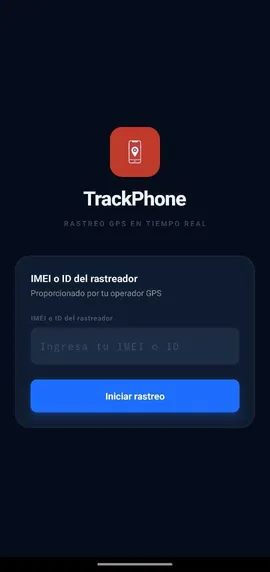
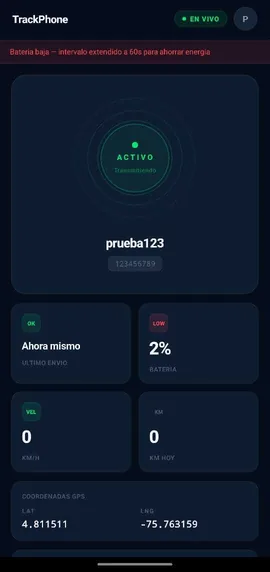
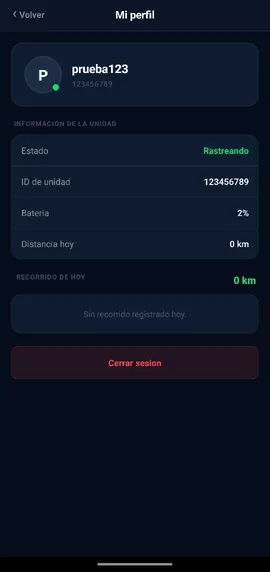
 TrackPhone
Track phones: the worker’s phone as one more GPS
For sales reps, couriers, technicians or guards who do not drive a vehicle with GPS.
- Turns the worker’s phone into one more GPS, with no device to install.
- It appears on your platform like any vehicle: map, trips, geofences and alerts.
- Sign-in with the IMEI or tracker ID you assign.
- With the explicit consent of the person carrying the phone.
- Automatic battery saving, and it shows the battery and the day’s distance.
Another line to sell to the same customers, without buying devices.
7 · For Colombia
FUEC online, included for your customers
- FUEC (the single contract extract form) online for special passenger transport: contracts, vehicles and drivers, with the extract as a PDF ready to hand over.
- It is included: there is no separate charge. You offer it to your customers as part of the tracking service.
- RNDC included, for cargo transport.
- PESV (Road Safety Strategic Plan) included, with the 24 steps in 4 phases required by the current regulation and photo evidence.
- GPS operating certificate with QR code verification.
With this you sell the special transport company something it needs by law, at no extra cost to you.



8 · Operating certificate
A certificate under your brand that verifies itself
Operating certificate under your brand
- Your own template: your logo, your signature, your seal, your text and the validity period.
- As a PDF, per vehicle or per company.
- With a public QR code anyone can scan to verify it.
- If the customer stops paying or the device stops reporting, the QR says “CERTIFICATE EXPIRED”.
OPERATING CERTIFICATE
Tools
More services to sell to the same customers
All of them are included. The ones with a third-party cost say so.

School routes with peace of mind for parents
- Live map of the bus with the real GPS.
- Routes, stops and students, with import from a file.
- Attendance when boarding and leaving by scanning the ID card.
- Automatic alert for a child left on the bus.
- Notice to parents when the bus is approaching.
- Student handed over only to an authorised guardian.
- Parent portal and on-board app for driver and monitor.

Operational control and dispatch
Trips, dispatchers, analysts and the company’s customers in one place. Permissions switched on per company. Its own mobile app.
FleetOps
Plan transport routes
Planning and optimisation of routes, stops and frequencies for staff and passenger transport.
RouteOS
Maintenance before the breakdown
Preventive maintenance with the real mileage from the GPS, not typed by hand; it warns before the failure and creates the work order.
FleetCare
Work orders for technicians in the field
For technicians and installers, with a record of what was done.
WorkOrders
Pre-trip inspection on the phone
Android and iPhone app: checklist by vehicle type, a photo for each item, driver and supervisor signatures, automatic PDF and approval or rejection.
InspectPro
Know who drives each vehicle
The driver checks in and out of the vehicle by scanning a QR code, does the inspection and sees the driving score.
PilotOS
Score every driver
By harsh acceleration, braking and turns, measured per 100 km, with profiles by vehicle type, ranking and a fleet report by email.
DriveIQ
Nothing expires unnoticed
Tasks and expirations (insurance, inspection, documents), with a reminder before they expire.
Remindo
Learn about a dead device before the customer does
Detects devices that stop reporting and the likely cause (power was cut, it ran out of power or it stopped communicating) and warns by WhatsApp before the customer complains.
FleetWatch
Prove the guard really passed by
Security patrols with checkpoints, plus visitors and incidents.
GuardCheck
Protect the cold chain
A warning if the temperature rises during the trip.
ColdChain
Control what has no engine
Trailers, containers, generators, machinery.
AssetTrack
Locate tools and equipment
With low-cost Bluetooth tags, using the phone as the reader.
TagRadarFollow a worker’s phone
Turns the worker’s phone into one more GPS, with no device to install.
TrackPhone
Track where there is no cellular signal
Satellite link for areas without cellular coverage.
SatLinkthird-party costWith every application you activate, you sell more to the customers you already have, instead of going out to find new ones.
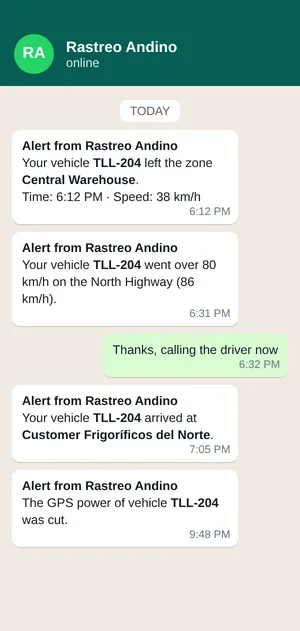
 WhatsApp alerts
Your own WhatsApp number alerting your customers
- Your number, not a borrowed one: the one your customers already know, with your business name.
- The alerts you set up on the platform are sent by WhatsApp, with the text you write: zone, speeding, arrival at a stop, power cut.
- It reaches your customer on their phone, not an email nobody opens.
- You can alert all your customers at once whenever you need to.
Admin tools
What to serve and sell with, at no extra cost
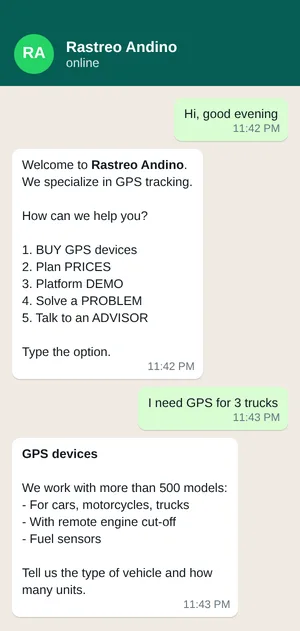
- WhatsApp sales chatbot: it answers and sells while you sleep. It replies at any hour, asks what the prospect needs and leaves their contact ready for you to call.
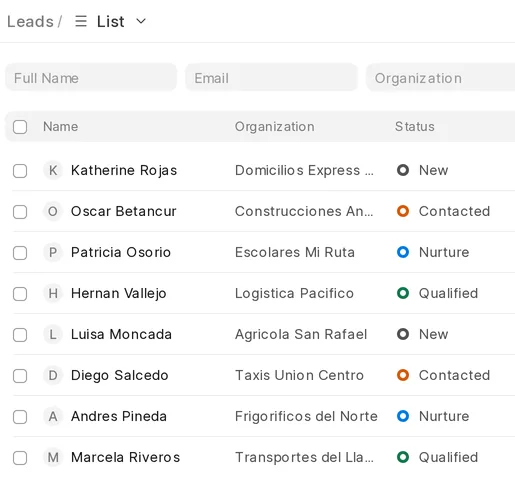
- Sales CRM: see who is interested, where each one stands and who you still need to call today.
- Support desk with your brand: your customers open requests with your company, with your logo and your name. Every case has someone in charge and a history.
- They are the same tools we use to serve and sell. They have no cost.
9 · Your distribution network
Create resellers and grow without losing control
- From your panel you create Reseller accounts below yours, with almost the same permissions, and set them a device limit.
- Each reseller creates their own customers and you keep control of your whole network.
- You create customers, activate and suspend accounts and vehicles from your distributor panel.
- Account types: User, Manager (who runs a company’s fleet) and Reseller.
- Companies: mark which vehicles belong to a company and every new user of that company receives them automatically, without assigning them one by one.
- Upload your own vehicle icons, visible only to your network.
- The data of each customer and each reseller stays completely separate: nobody sees anyone else’s information.
Companies: a company’s vehicles reach its users by themselves
 10 · Support and training
Luna handles your customers’ support for you, at no cost
- Luna, an AI assistant: answers your customers instantly inside the panel and the app, in Spanish, English and Portuguese.
- It answers what is asked most: where the vehicle is, how to create an alert, why a device is not reporting.
- It takes the repetitive work off your team. It has no cost.
We train you and your customers
Support from real people and training for you, your team and your customers.

Communication with your customers

Notify all your customers at once
Announcements in their language, scheduled or as a draft, and you see who read them and whether on web or app.
NoticeShow what is new on the platform
Your customers see the news with a link to the manual.
NewsAlerts by WhatsApp
GPS alerts arrive by WhatsApp (the messages have a third-party cost).
WhatStar
Win and keep customers by email
Email campaigns for your company.
Mailux11 · API and integrations
Integration store
More than 380 webservices connected, and we connect any other system that works. We do not charge for building the webservice. The store below lists the ones you can check today, with their real status.
- Developer access (API): access keys and documentation so your customers can take tracking data into their ERP, TMS or in-house software.
- FleetSync: sends your vehicles’ positions to third-party platforms (shippers, insurers, corporate customers) without duplicate work.
- Webhooks on alerts, so another system receives the event the moment it happens.
- If the system you are asked for is not on the list, we connect it, as long as it has a connection that works. We do not charge for building the webservice.
163 integrations and tools in the store
- Ready to activate works today: set up with your customer’s credentials.
- Included our own tool, part of the per-vehicle price.
- On request we connect them when your customer needs them. They are not running today.
Other companies’ names are used only to indicate which system it connects to; they belong to their owners.
12 · Your own version
Your own version of the software
- Customisation from your panel: server name, logos, colours, default language, date and time formats, distance, capacity and altitude units, vehicle card type and maps available to each user.
- Email and SMS templates with your own texts.
- You decide which tools each customer sees.
- Your own operating certificate template: logo, signature, seal, text and validity.
- Need a different version? Your own features, another look or an app for a specific business line: we build it on the same base and assess it with you.
13 · Backup and trust
Why you can trust us with your business
Own map in Colombia and addresses from our own server
The «Appogio» map layer runs on our server for Colombia, and so does address lookup. In other countries the map uses external layers.
Daily backup
Of all the information.
Backup server on another continent
Takes over the service if the main one fails.
Two connection domains
So the GPS devices keep sending data in an emergency.
Each customer’s data kept separate
Nobody sees anyone else’s information.
Permanent monitoring
Of the servers, all the time.
14 · What you pay
Price per active vehicle, in US dollars
The same in every country. No per-module fees.
Month to month
Minimum 10 vehicles
| Vehicles | Price per vehicle per month |
|---|---|
| 10 to 100 vehicles | US$1.00 |
| 101 to 200 | US$0.75 |
| 201 or more | US$0.50 |
per vehicle per month
Annual payment in advance
No minimum
| Vehicles | Price per vehicle per year |
|---|---|
| 1 to 25 vehicles | US$7.00≈ US$0.58 per month |
| 26 to 50 | US$6.50≈ US$0.54 per month |
| 51 to 100 | US$6.00≈ US$0.50 per month |
| 101 or more | US$5.00≈ US$0.42 per month |
per vehicle per year
On a monthly or annual plan. With fewer vehicles, US$90 for both, a single payment. Or use Cliente GPS, our unbranded app, at no extra cost.
You do not pay for developer accounts. If you prefer, you can publish them on your own Google Play and App Store account.
- That price includes the platform, your brand, the applications, the backups, support and all future improvements.
- Pay by PayPal, or in Colombian pesos through Wompi (Nequi, PSE, Bancolombia or card).
- Anything with a third-party cost (video, satellite, WhatsApp or SMS) is disclosed before you activate it.
Frequently asked questions
What people usually ask before switching
Do I have to replace the GPS units I already installed?
No. We do not sell devices, only software. There are more than 3,200 supported models, so most likely yours already work. You can look them up in the compatible devices catalogue.
Will my customers see another company’s name?
No. Your domain, your logo, your colours, your emails, your two apps and your manual. No screen, email, app or manual shows another company’s name.
How much do the apps under my brand cost?
They are free from 101 active vehicles, on a monthly or annual plan. With fewer vehicles, US$90 for both, a single payment. We publish them on our store account, and if you prefer you can publish them on yours. And if you would rather not wait, your customers can use Cliente GPS, our unbranded app, at no extra cost.
What is paid separately?
Only what has a third-party cost: video, satellite link, WhatsApp or SMS. We tell you before activating it.
Can I have resellers below me?
Yes. You create Reseller accounts with a device limit; each one creates their customers and you control the whole network. Each one’s data is kept separate.
What happens if the server goes down?
There is a daily backup, a backup server on another continent that takes over if the main one fails, and two connection domains for the devices.
Can it connect to the system my customer uses?
There is a developer API, webhooks on alerts and ready connectors for transport authorities. If the one you need is not there, we connect it on request. We do not charge for building the webservice.
Want to see it working?
Message us and we will send you access to the demo so you can explore it calmly before deciding.